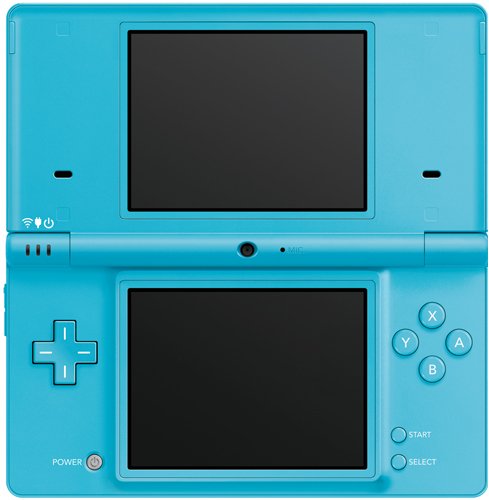

Nintendo DSi is a new hand held portable game system for anytime, anywhere fun and more. Enjoy the largest screen size, best audio quality and thinnest design of any system in the Nintendo DS family. Download exclusive games, clocks and calendars via the Nintendo DSi Shop. Take pictures using either an inward or outward facing camera and chose from 11 different lenses to customize your shots. Connect wirelessly to browse the internet, share photos and play with others. Access your music in the AAC format off any standard SD Card. The DSi cannot play GameBoy Advance titles.
Modern handheld gaming has long been dominated by Nintendo and Sony. Each hardware manufacturer has multiple viable offerings derived either directly, or evolving from the respective DS and PlayStation Portable product lines. All of these devices are impressive multifunctional devices, with designs meant to encourage gameplay on the go, integration with the Internet, backwards compatibility to previous games, and so on, but each goes about this in different ways. Taking a few minutes to examine the main features, and getting more familiar with available options, accessories and possible limitations of each handheld is the optimal way to determine which is the best choice for a player.
Handheld Console Choices
Nintendo 3DS
View larger
|
Nintendo DSi/DSi XL
View larger
|
PSP
View larger
|
PSPgo
View larger
|
PlayStation Vita
View larger
|
|
| Suggested Retail Price (prices may vary) |
$169.99
|
$149.99/$169.99
|
$149.99
|
$199.99
|
$249.99 – $299.99
(February 2012) |
| Display |
Dual screen: upper – 3.53″ LCD, lower – 3.02″ LCD touch screen
|
Dual screen, backlit, 3.25″/4.2″, LCD with 256 x 192 resolution
|
4.3″ full transparent
|
3.8″ full transparent
|
5″ OLED multi-touch screen
|
| Internal Usable Memory |
64 MB
|
NA
|
64 MB
|
16 GB
|
TBD
|
| External Media Storage |
SD memory card
|
SD memory card
|
Sony Memory Stick Duo
|
Memory stick micro
|
New proprietary “NVG” flash cards
|
| Size |
5.3″ (l) x 2.9″ (w) x 0.8″ (h)
|
5.4″ (w) x 2.9″ (l) x 0.74″ (h) / 6.3″ (w) x 3.6″ (l) x 0.84″ (h)
|
6.7 (w) x 2.7″ (w) x 0.7″ (h)
|
5.0 (w) x 2.71″ (h) x 0.65″ (d)
|
7.2 (l) x 3.3″ (w) x 0.73″ (d)
|
| Weight |
8 oz.
|
7.5/11.1 oz.
|
6.7 oz.
|
5.5 oz.
|
TBD
|
| Colors |
Aqua Blue, Flaming Red, Cosmo Black
|
7.5 oz.
|
Piano black (other colors via bundles)
|
Piano black, Pearl white
|
Black (other colors to follow)
|
| Backwards Compatibility |
Plays most DS and DSi games
|
Plays all DS games
|
Plays all PSP games in UMD format, or available via download; also plays downloadable PS1 games for PSP
|
Plays all PSP games available via download and PS1 games for PSP
|
Plays all PSP games available via download and PS1 games for PSP
|
| Wireless Communications |
Supports local Nintendo wireless connectivity between devices and IEEE802.11 b/g Wi-Fi connectivity
|
Supports local Nintendo wireless connectivity between devices and IEEE802.11 b/g Wi-Fi connectivity
|
Local ad hoc connectivity between PSP devices and infrastructure Wi-Fi connection options
|
Local ad hoc connectivity between PSP devices and infrastructure Wi-Fi connection options
|
3G support in one or two hardware releases; standard ad hoc connectivity between devices and infrastructure Wi-Fi connection options in both
|
| Online Media Portal |
Nintendo eShop
|
Nintendo DSi Shop
|
PlayStation Network
|
PlayStation Network
|
PlayStation Network
|
| Streaming Video |
Netflix*
|
No
|
PSN movie rentals, and other video content
|
PSN movie rentals, and other video content
|
PSN movie rentals, and other video content
|
| Internet Browser |
Built-in
|
Built-in
|
Built-in
|
Built-in
|
Built-in
|
| Console Integration |
Yes, with Wii
|
Yes, with Wii
|
Yes, with PS3
|
Yes, with PS3
|
Yes, with PS3
|
| Game Media |
Game card and digital download
|
Game card and digital download
|
UMD disc and digital download
|
Digital download
|
Digital download, alternate media TBD
|
| Online Multiplayer |
Yes
|
Yes
|
Yes
|
Yes
|
Yes
|
| Local Wireless Multiplayer |
Yes
|
Yes
|
Yes
|
Yes
|
Yes
|
| Estimated Battery Life |
3-8 hrs
|
3-14 hrs
|
4-6 hours
|
4-6 hours
|
TBD
|
| Input Method |
Touch screen, face and shoulder buttons, circle pad, motion/gyro sensor
|
Touch screen, face and shoulder buttons
|
Analog stick, D-pad, face buttons and shoulder buttons
|
Analog stick, D-pad, face buttons and shoulder buttons
|
Front and rear touch inputs, 2 analog sticks, D-pad, face buttons and shoulder buttons
|
| Digital Camera(s) |
3 (0.3 megapixels); 3D capabilities
|
2 (0.3 megapixels)
|
No
|
No
|
2
|
| Built-in Microphone |
Yes
|
Yes
|
Yes
|
Yes
|
Yes
|
| Graphic Quality |
Top adjustable 3D screen – 800 x 240 resolution; lower screen – 320 x 240 resolution
|
256 x 192 resolution
|
480 x 272 resolution
(16:9 aspect ratio) |
480 x 272 resolution
(16:9 aspect ratio) |
960 x 544 resolution
(16:9 aspect ratio) |
| General Game Price Range |
Standard:
$19.99 – $39.99 Downloads: $1.99 – $4.99 |
Standard:
$19.99 – $39.99 Downloads: $1.99 – $4.99 |
Standard:
$19.99 – $39.99 Downloads: $1.99 – $4.99 |
Standard:
$19.99 – $39.99 Downloads: $1.99 – $4.99 |
Standard:
$19.99 – $39.99 Downloads: $1.99 – $4.99 |
Online Play and Functionality
The wireless revolution in personal electronics has made online functionality and connectivity to the Internet a huge focus in handheld gaming. Every handheld console has an online arena that has either been built specifically for it, or that has been adapted to suit the needs of online players. By utilizing these portals players can greatly expand their chosen platform’s potential, maximize gaming fun and increase the overall entertainment value of their devices.

The Nintendo eShop is your one-stop shop for exciting downloadable games, videos, applications, and so much more. Discover all-new 3D software, plus legendary titles from gaming past remastered in 3D. Revisit with classic portable “Virtual Console” games starring Mario, Link, many other faces from the Nintendo catalog of games. Gain access to hundreds of previously released DSiWare games, applications and much more. Browsing the Nintendo eShop is incredibly easy, and fun. Find any title in seconds, then view screenshots, game info, and even video to help you make your purchase. You’ll even find details and 3D video of Nintendo 3DS games available at retail stores. All games are able to be saved in your own custom wishlist so you can always remember the titles you want to get.

DSiWare through the DSi Shop is a service that allows DSi players to download games and applications directly to their handheld console in exchange for DSi Points purchased through a local retailer. Experience new and innovative gameplay, fresh takes on the classics-and much more. Just shop, download, and enjoy. Visiting the DSi Shop is easy, just establish wireless broadband connection, click on the Nintendo DSi Shop icon from your menu screen and browse the shop and use Nintendo DSi Points. Games and applications can be saved to SD cards (sold separately).

PlayStation Network is an all access pass not only to a world of gaming, but also one of entertainment at-large. The service is 100% free, only requiring a PlayStation handheld (or a PS3) and a broadband connection to the Internet Once you are in visit the PlayStation Store where users can download games, first run and classic movies, previews, DLC add-ons for games, game demos, music and original PlayStation oriented streaming video content. Purchases can be made using a credit card or a PlayStation Network Card purchased offline. Content can be stored on external media or within the hard drive of the PSPgo.
* Existing Netflix unlimited membership account required.
Product Features
- Enjoy the largest screen size, best audio quality and thinnest design of any system in the Nintendo DS family
- Download exclusive games, clocks and calendars via the Nintendo DSi Shop
- Take pictures using either an inward or outward facing camera and chose from 11 different lenses to customize your shots
- Connect wirelessly to browse the internet, share photos and play with others
- Access your music in the AAC format off any standard SD Card
A Good Step Forward for Nintendo’s Prime Handheld Pros:+Bigger and slightly brighter screen+New interface is easy to navigate+DSi Ware is a nice implementation+Digital camera to take photos with+Internal memory and SD card slot are nice for storing data+Downloaded games are inexpensive and the service has a lot of potentialCons:-Photos taken on camera only really look good on the DSi screen-Shorter battery life-Web browser isn’t the greatest-The lack of a GBA slot means you can’t play GBA games, use some of the DS Lite’s accessories (such as a rumble pack) and makes some games like Guitar Hero World Tour virtually unplayableIn 2004, Nintendo released the original Nintendo DS. Just two years later, the Nintendo DS Lite debuted and was better than the original by far. Since its original release, the Nintendo DS has gone on to sell more than 100 million units worldwide. With sales numbers like that, why would Nintendo need to release another revamp of their prized handheld? More than that, are the new features worth picking up if you have a DS Lite or if you still have an original DS? Well, it can be, but if you’re perfectly content with your original DS or your DS Lite there’s nothing wrong with that, and you don’t have to buy it. That’s not to say it would be a bad investment. For some it might be worth it.Certainly if you still have the original DS, it is worth investing in this newer update. There are quite a few new things about the Nintendo DSi that can make it worth buying. One of the first changes that is obvious from the moment you see it is that it’s slightly smaller and designed a little differently. The power button has been moved and now doubles as a reset button. The screen is also slightly bigger and brighter than the DS Lite. When turning it on, there is also a notable difference in the interface which has been completely reworked all together. It’s been made a bit easier to use.Perhaps the biggest and most notable difference is that the DSi no longer has a slot to play Gameboy Advance games. If you’re still playing your GBA games a lot, this is probably a pretty big subtraction when it comes to the DSi, no matter how much it includes. If you’re someone who hasn’t used your DS for playing GBA games in a while, it’s probably not a big deal, but I would’ve gladly taken a slightly thicker handheld just to maintain the GBA slot. There is, however, a slot for an SD card to store more data. The first of these is the wi-fi service which you can get on and download some downloadable games for the DSi. Much like the Wii, you’ll spend points (100 points is equal to one dollar) to buy games. There’s also the built in web browser, but this is not something to jump up and down over really, as it isn’t a very good web browser.The camera is a nice addition, allowing you to customize and mess around with the pictures you take. They don’t look good on anything but the DSi screen, however, but you can store them on an SD card or the DSi’s internal memory. You can take quite a bit of photos, and mess around with them in interesting ways, such as drawing on them or manipulating faces. It can be fun to mess around with.While the new additions are nice the more expensive price is a bit much for those who are already carrying a DS Lite. There are some new features but there isn’t too much done here to enhance the gaming experience itself outside of a larger screen. However, that doesn’t mean it isn’t worthwhile. The download service in particular can be very worthwhile in the future. The games on the download service also aren’t too expensive. In short, even DS Lite owners might find it worth the extra money after a while.Another big hit to the DSi is that the battery life just isn’t as long as the previous incarnations. For those wanting to use it primarily for gaming, it might surprise you that the DSi will need to be charged a lot more frequently, as the battery last five hours shorter than that of the DS Lite. It takes a bit shorter to charge as a result, but you’ll find yourself charging it quite a bit, especially if you play with the screen on the brightest settings.In the end some may wonder if the upgrade is worth it. It’s a bit more expensive than the DS Lite and doesn’t have a GBA slot and a shorter battery life. However, you are getting some nice extra features, and with Nintendo planning to implement them in some of their games in the future, it’s at least worth consideration. DS Lite owners may not need to upgrade immediately, but in the future it might be worth considering. If you don’t own a DS at all, the DSi is probably the best bet.The Nintendo DSi is a nice step in the evolution of Nintendo’s handheld. It has a lot of new features that can go a long way. Even DS Lite owners might want to consider updating at some point, but it still…
Solid performer for a handheld console and it has a (limited) web browser INTRODUCTION:I was getting this system, as an adult gamer, with the intention of playing games, and to use this as a browser for when I am away from home. I do not play Game Boy Advance games, although my daughter does. I have to warn parents looking into this system that there is no slot for Game Boy Advance (GBA, for short) or the Guitar Hero interface. This system is by no means a major upgrade with the exception of being able to download games or take photographs.WHAT IS IN THE BOX:ConsoleTwo styliInstructionsPlugTaking this item out, I proceeded to protect the screen with a screen protector. I purchased a DSi Starter Kit to give me cases for cartridges, extra styli and a carrying case.CONSTRUCTION:The Nintendo DSi comes in a matte finish with a smooth texture. The touch screen measures 2.5 inches. An internal microphone is placed in the center just under the top screen. A rubber cover secures the port for the SD card. A slot for the DS games is in the same spot, as previous generations. Volume control is by a +/- switch, unlike the sliding volume switch of the DS phat. An LED indicator notifies you that the WiFi radio is on.The keypad buttons feel firm not mushy.The power button also serves as a reset button. This is convenient when switching from one cartridge to the next or when switching from the internet to the main menu. The directional buttons, X, Y, A, B, and L, R are in the similar neighborhood as prior generations.The matte finish is fingerprint-proof but I have a feeling it is not scratch proof. The screens are very glossy and may create a perceptible glare in bright lights or outdoor settings. The case opens up to nearly flat.I was disappointed that the plug was not a matching black color. It was more of a grayish white.SETUP:I set up the DSi with the pre-existing charge from the factory to enter my name, a phrase, the parental controls with a PIN, accessed my Club Nintendo account, and downloaded the Opera Browser.The DSi recognizes handwriting (not really “Doctor’s Handwriting”, like mine) or uses the keyboard. The handwriting boxes give a choice of what you are trying to write but it is slow. Typing is faster but cumbersome.Setting up the browser is hidden in the Tools Menu. You can toggle the WiFi radio on or off. When you set up the internet, it is a matter of choosing what type of encryption your router uses. I use WEP so I entered the “Hexadecimal” key which was quite long – no paraphrasing is allowed. Once my information was entered, it connected rather quickly. When I logged into Club Nintendo, I had to read the `license agreement’, agree and then the firmware was upgraded. That took about 2-3 minutes and then the system had to be restarted. As soon as the technicalities were completed, I was ready to download the Free Opera Browser.When you link your DSi account with the online Club Nintendo account, you get 160 coins that can be applied to acquiring products.BATTERY LIFEWhen compared to the DS, the battery life is less. When you factor in the wireless capability, it is even shorter in life. So, if you are not in a `hotspot’ or have access to a wireless network, then shut it off to conserve battery life.THE CAMERAThe 0.3 megapixel cameras are toggled by the touchpad’s `switch’ button. When you take a photograph, you can edit it with the various programs and save it to your album. I find it fun to edit photos and allow morphing (from the adult perspective) and I will likely use my photo for an avatar for various websites. For casual photography, this will not be too useful given the low resolution. Its purpose is solely for entertainment and DSi-type photo-editing.Photos can be shared only 2 ways, wirelessly to other DSi units within 65 feet or by the SD/SDHC Card. It cannot be emailed through your browser.No video can be recorded.SOUND QUALITYAAC is Advanced Audio Coding unlike the iPods which are MP-3 players (Motion Pictures Expert Group, Layer 3). AAC is a lossy compression format, that some experts say may have better sound quality than an MP3. To me, they sound virtually identical. How do you convert to AAC? If you use iTunes:Highlight the songs to convert (Control and Left Mouse Click)Click AdvancedSelect “Create AAC Version”.I would recommend highlighting the song and renaming it “Song A AAC” so you can search for AAC version on iTunes, utilizing the finder bar. I select/highlight the songs in iTunes, and then “pasted” them into my SDHC card. The DSi automatically finds the `music’ files but I was able to listen to the audio portion of my videos that I recorded from my HD Camcorder.Sound quality from…