
0
0
0
0
0
0
0
0
0
or copy the link
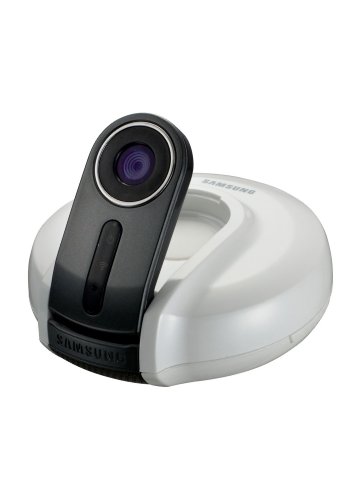
The excellent Samsung SmartCam SNH-1010 Baby Monitor brings the convenience and security to monitor your baby’s safety using your smartphone, tablet, laptop, and/or PC. Upload your captured footage directly to YouTube or Picasa, thanks to its built-in Wi-Fi 802.11 b/g/n connectivity. The Samsung SmartCam SNH-1010 Baby Monitor also features a VGA 1/6 inch CMOS sensor which delivers vivid and high-quality visuals, plus it automatically detects motion and sound and notifies it quickly to you.
Product Features
- One Push Setup in 30 seconds
- Built-in Mic and Speaker for Two way talk
- Built-in IR LED Lamps for Night vision
- Audio and Motion detection and notification
- Monitor on PC, MAC, and smartphones, Free and easy recording on YouTube
Better Choices Out There This isn’t bad product. It does what it’s meant to do. Just not very well, and certainly not to warrant the price. I’m an expecting new dad shopping around for a video monitor. My sister recommended the Motorola MBP36 that she’s been using. This and the the Summer Infant Infant model seem to be the mostly highly regarded. But I really liked the idea of being able to view from anywhere, on iPhones, iPads and Android. (I currently have an iPad and a Samsung Galaxy Note). So I thought I’d give it a try before spending the big bucks for those dedicated monitors. It wasn’t the easiest set up but I eventually got it all set up. I’m a tech guy, I work in networking. I actually found this “easy and guided” way of setting things up very much trial and error.Pros:-It allows you to view from any internet connected device or computers.-Doesn’t need you to know how to configure your router or network to view them.(I Actually consider this Con, but most people would consider this a Pro, more on this later).-It’s small and easily mounts.-WiFi support, although you have to connected it to the LAN connection for setup unless you have WPS support on your router.Cons:-The internet viewing is done via an external service from Samsung’s server. This causes a huge amount of latency so the video is delayed and not smooth at all. You also have to register the device and sign in to there service.-the night vision is pretty bad. The infrared LEDs are far too few and weak. This makes it almost useless as a baby monitor while the baby’s sleeping in the dark.-Normal video quality is barely acceptable. If you’ve never tried one of these of devices before, you might think it’s not that bad. After looking at my sister’s Motorola unit, it was pretty clear (or not clear).-Audio, both direction is terrible.-Doesn’t support any sort of Pan/Tilt/Zoom.-Recording feature is useless, mainly because of the subpar video quality and frame-rate.With those shortcoming, I had to return it. I considered going with the Motorola unit first, but although the picture quality and features were nice, it was expensive. I’d asked around and found that baby monitors with dedicated video displays, the display unit often degrade because they use low quality LCD screens.So I did a bit more research and tried something not even advertised as a “Baby Monitor”. The Foscam FI8910W. It a IP Camera with excellent features and performance. Once I tried this, it was day and night. The setup is more geeky. To view the feed from the internet, you’ll have to know how to setup your router for port mapping and have either a static IP or Dynamic DNS. But for a person like me who deals with this stuff all the time, it was quite simple, no trial and error. Either you know how to do or you don’t. Like the Samsung, you’ll need to connect it to your LAN for setup before using it over WiFi. You’re streaming directly from the Camera so there no delay and the video quality, although not HD (there’s also an HD version the FI9820W but never tried this), is fantastic! The night time performance is awesome. It supports Pan and Tilt, but not Zoom (some software will allow digital zoom, but this is pretty useless). On my iPad it looks amazing, way better than even the Motorola unit. Same on my Galaxy Note and any computer. The video doesn’t degrade when you’re connected from outside your home network. The two-way audio, although not fantastic is more than acceptable. It’s a bigger unit, but it doesn’t take up much more room than the Samsung, which is flat. The biggest plus, it’s less than $90 on Amazon. So while I wait for my wife to pop, I’m using the camera to monitor my Dog while I’m at work. I’ve even been able to get his attention when he’s up to no-good while I’m at the office.
Don’t even bother I bought this item, relatively sight unseen, without reading the initial reviews here. (This was a mistake) Out of the box, I was able to connect the device to the LAN, set up my account via the website, and get the camera working. Where the problems started was with the Wireless set up. I followed the instructions in the quick start guide, and the device was able to detect our network. When I entered the password, it failed to save the settings. We tried every different option, ensured our password was entered correctly, and still was unable to connect. We also validated that it did not work on multiple devices when trying to update via the SmartCam website. (2 different laptops, 2 different OS’s and a tablet) The support site for Samsung was also no help with this error, when we searched their troubleshooting FAQ’s. Because our overall poor experience (usability, time wasted, lack of information from the OEM) we are returning this monitor. I suspect we can get a better device for the same price.
actually not as bad as noted in other reviews We use the camera as a nanny cam. The camera is up and running for 4 months continuously and we did not have any issues. A recent firmware update decreased the latency of the camera on a local wireless network from 2 seconds down to maybe 0.5 seconds. The only thing I am unhappy is the android software support. Currently, the app does not support android 4.1 (jellybean). Hence at work, I am forced to use my compute rather than my smartphone. Also I was hopping that I would have an app on my Samsung SmartTV to log into the camera. One important thing: The smartcam is using peer-to-peer connection. Hence, you have to connect do each camera individually. Only if you connect to the camera, you will use bandwidth. This is in strong contrast to the dropcam solution. The dropcam solution is set up as a online dvr (digital video recorder) system. All data is sent via a dropcam server (US based) and hence the local area network will see much more traffic. The samsung smartcam only allows event recording to a private youtube account. If you are looking for surveillance 24/7, certainly the dropcam solution (monthly charge applies) is the better choice. Re-routing the traffic via a server vs peer-to-peer will add up to increased latency (5 seconds). Another note: I could not observe the timeout issues described by other reviewers.