
0
0
0
0
0
0
0
0
0
or copy the link
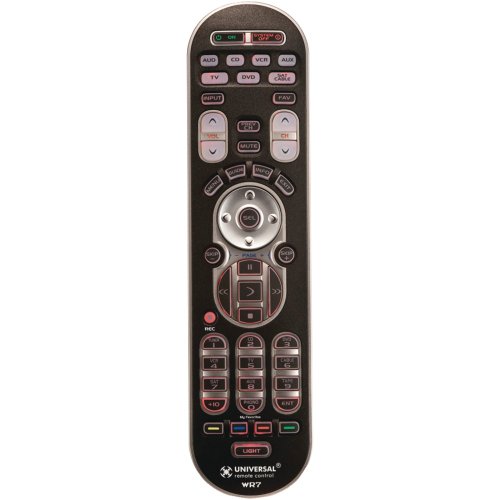
URC-WR7 REMOTE CONTROL – 7-component pre-programmed learning remote, Controls up to 7 different Audio/Video components, Operates virtually all brand of Audio, TV, DVD, CD, VCR, Cable and Satellite, Device buttons light up to indicate operating activity, Fully Backlit Buttons — easy to see in dark rooms, Ergonomic design features strategically-located button clusters engineered for comfort & easy use, (OSD) On Screen Display, Complete Menu Functions, Sofa Mode Feature and Low Battery Warning Feature [blank]
Product Features
- 4 My Favorite Channel Buttons
- Simple Sound.
- Macro Power.
- Combines 7 remotes into 1.
- Quick Setup
Friendly, reliable, powerful, cheap The WR7 is the best remote I’ve owned. I love it. So does my wife. It does everything I want (and I’m picky), is guest-friendly and geek-friendly, and it costs twenty bucks. You should buy it.Other reviews have summarized well what’s great about this remote, so I’m just going to add some geek details.What I love: – Separate on and off buttons. Simple, but a huge ease-of-use win. Many devices now have discrete on/off codes, and this remote finally lets you use them. A big help to reliability when you’ve programmed a “system on” macro. – No LCD screen. Nice idea, but more often than not a crutch that replaces good design. Demands that you look down at the remote, takes space away from keys, and is typically butt-ugly. – Programmable macros, even on the device keys. So you can program the “DVD” button to switch the inputs on the receiver, the “TV” button to switch the Tivo to live TV mode, etc. Similar to the much-hyped “activity based” Harmony/Logitech remotes. – Decent IR emitter. So you hardly ever have to hit a key more than once, and macros execute reliably. – “Punch through” capability on most keys, so that the volume up/down keys can control the AV receiver volume no matter which device the rest of the remote is talking to. – Decent remote code database, and decent learning capability.I’ve set ours up so that “power on” turns everything on using discrete codes, switches the receiver to the Tivo, sends the Tivo to the “Now playing” screen, and leaves the remote talking to the Tivo. This is 80% of our use cases taken care of. The “power off” key switches everything off using discrete codes, there’s another 10% of the use cases. All of the device keys power up the relevant devices and switch the receiver inputs.My last remote was a One-For-All 9910 that I’d JP1′d the heck out of, and this remote is better in almost all respects from a usability point of view. The 9910 was far more hackable, but for all the effort the end result was unsatisfying. Too many keys, and yet still missing some.There are two aspects that could be improved in this remote: – Programming “advanced codes” is a bit weak. There’s a way to access any key code the device’s IR protocol can support, but it’s hard to use. Since my original manufacturer’s remotes didn’t have keys for the discrete power on/off codes, I actually relied on my previous remote (the 9910) to help learn those. – Wish it had RF, so it could go through the cabinet doors. The after-market RF extenders are a stopgap that I’m considering, but they don’t look that great and are way more expensive than the remote.All up, I’m extremely happy with WR7. If you’re up for a little bit of programming, you can make this one fine remote.
Learning function is teriffic I bought this to replace my universal remote that the dogs chewed up. This remote has several features, and lots of buttons. I like the red light up buttons as it makes it so much easier to find the button I am looking for in the dark.My favourite thing about this remote is the many ways in which to find that pesky code. I find that often typing in the code for your brand of TV, VCR, whatever doesn’t work and you can spend hours trying to figure out the proper code. There are at least four different ways (including a list of codes) to program this remote so something will work for your device. My favourite thing is the “learning” mode. You simply put it into “learning” mode and then copy the functions from your old remote to the new one and you can choose which buttons go where. I programmed my TV, cable box, and DVD player all within about 5 minutes and without having to enter a single code. Brilliant! Plus I was able to transfer the sleep function onto a key of my choice (that is the only button that seems to be missing from this remote).My only complaint is that it is rather large, but that can be a good thing too as it’s easier to spot in the couch cushions or under a blanket.