
0
0
0
0
0
0
0
0
0
or copy the link
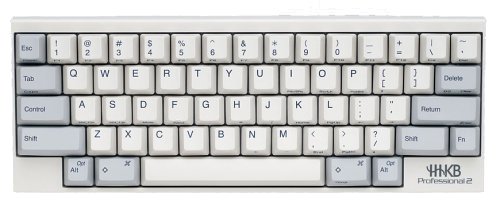
Ultra-compact 60-key ANSI Layout Keyboard
60-Key modified US ANSI Layout
45gram sensitivity, 4mm travel Electrostatic Capacitive Key Switches
Dimensions: 294 x 110 x 39.9mm (11.6 x 4.3 x 1.6in)
Detachable USB mini-A interface, 1.8m cable included
Integrated USB 2.0/1.1 Hub (Current supply limited to 100mA)
Keyboard mode selection dip-switch
Weight: 530g (1 lb 3oz)
Made in Japan
Product Features
- for Professional use Keyboard.
- Ships directly from Japan via Express Mail International
Best keyboard period I was a BIG fan of the original Thinkpad keyboards and have many keyboards such as: old Logitech keyboards, the original Mac G4 cube keyboard, Microsoft Natural Pro (with the solid palm rest molded into the frame). I thought I was satisfied with the Microsoft keyboard… until I tried a Happy Hacking Professional 2 keyboard at a coworker’s desk. oh man. The Happy Hacking blew me away. It’s such a great keyboard. I switched to a Happy Hacking Pro 2 and never looked back.I code and write a lot and my fingers never get tired with the Happy Hacking Pro 2 keyboard. The key feel is sublime. There is no unnecessary keys such as caps-lock (the control key is there), ‘windows’ key, or F-keys. Bare minimum and designed for maximum typing and coding. I miss this keyboard every time I am on the road with my Thinkpad x200 keyboard typing for more than 5 minutes. It’s just that good.Absolutely the best keyboard on the market and worth every penny I paid for.If you spend any time on your computer typing OR your work is involved with typing, this is the best investment you can make for your health and productivity.
Happy Hacking Pro I dropped the three-hundred dollars for the Happy Hacking Pro 2 White/Printed version because I heard nothing but good things about it. I got it with two day shipping from Canada for 15 dollars from elitekeyboards.com. After typing on it for a few weeks, I am so glad I didn’t settle for the Lite version and spent the extra money for a REAL keyboard. As a result of typing on my HHKB Pro 2, I sold my Adesso, Cherry MX Blue. The tactile Adesso, a fine keyboard that I used for a year without any sort of problem was supremely unsatisfying after typing on the Topre Capacitive switches that the Happy Hacking Pro uses. The Topre switches, in my opinion, are better than any Cheery MX Switches. The feeling is different, a pleasant sort of clompiness, super easy to press, ergonomic, it is a tiny keyboard but it has huge, unmissable keys. The only keyboard that compares with the HHKB Pro in terms of the typing experience is the IBM Model M. I bought my Model M a while before my Happy Hacking kb, and have since gotten rid of all my other keyboards. These two keyboards simply feel the best and are the most reliable. They are essentially the only two keyboards you need. My family thinks I have a keyboard fetish, but maybe I do, and the Happy Hacking is like a wet dream that never ends.The IBM Model M is a ten-pound tank, very loud, that will likely outlive me. My Happy Hacking keyboard is more reasonably sized, at 11.6 inches – compared to the Model M’s 21 inches. I think the HHKBPro weighs abou 1.5 pounds. It has two levels of feet, so it can be adjusted to two slanted heights. It doesn’t move around on the desk at all when you type. The detachable cord is sturdy and long. I am tempted to get the carrying case for it at elitekeyboards.com, though it is difficult to justify a fifty dollar case when probably any old computer case will do. It hardly takes up any room on my desk, and I love having my mouse so close to my right hand. I remapped a few of the keys to make things easier and add more features. It might be necessary to use a combination of the DIP Switches in the back of the keyboard and your computer’s remapping settings to get the right setup for you, especially if you have the “otaku” version of this keyboard. The DIP Switches change the actual circuitry in the keyboard, so there are some key combinations that are not so easy to manage. For instance, I had to make my Command key on the left into a function key, and both ALT keys into command. This means I don’t have an ALT key, but I find I don’t really use it ever anyway. I like having a function key on both sides, but it is also imperative to have a command key on both sides since I use a MacBook, it’s just that now both the Command key on the right and the ALT key on the right are Command keys. This is slightly annoying, but this keyboard does everything a full sized keyboard does and is so much better anyway, that I don’t really care. In short, there are any number of ways you can customize the keys, and I suggest experimenting.If you are thinking about buying a cheaper keyboard, like the Das, Adesso, Filco, Mattias, or Rosewill, think carefully. If you are a gamer, you might enjoy those keyboards, they are by no means bad keyboards. But seriously, there is no mechanical keyboard in that price range that feels anywhere near as good as the Topre Capacitive Switches – these things are in a league of their own. Elitekeyboards.com also has some Cherry MX keyboards in the Leopold line, though I personally like the Das and Adesso for their design and build. I don’t have any desire to get another Cherry MX keyboard ever again though, after using my HHKB Pro. Also my friend who was thinking of getting a Das tried out my Model M and HHKB Pro and stopped himself from getting a Cherry MX switch keyboard. So I’m not just imagining things. This keyboard really does feel amazing. Once you get used to the control key and delete key positions as well, it just makes so much more sense. My type racer score jumps up to ninety words per minute when I use my happy hacking keyboard. Finally it is less tiring and actually faster, quieter, and just as tactile as the best keyboard ever made: The IBM Model M (basically uncontested). If you care about how your typing feels, get a Happy Hacking Pro 2 while they are still around – because I think most suppliers are running out of them!