

Powerful, full-featured Fire tablet—with beautiful 7″ IPS display, fast 1.3 GHz quad-core processor, rear and front facing cameras, and up to 128 GB of expandable storage.
Tiny price. Big Fun.
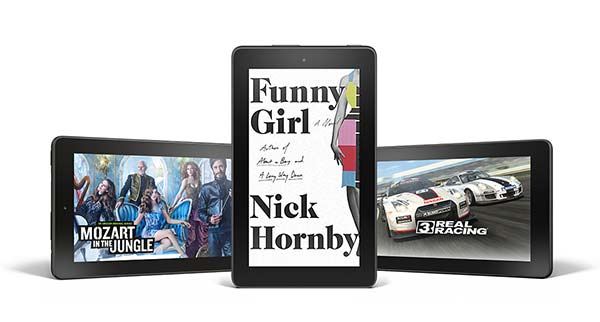
Fast and responsive
The fast quad-core processor consists of four high-performance 1.3 GHz cores, for quick app launch times, smooth games and videos, and great overall performance.
Beautiful 7″ IPS display
Fire features a 1280×800 high definition LCD display with over a million pixels (252 ppi) and a brighter display for more vibrant colors and whiter whites.
No more worrying about storage space
Keep photos, movies, and compatible apps and games with you using a microSD card slot to expand your tablet’s storage by up to 128 GB. Plus enjoy free unlimited cloud storage for all your Amazon content and photos taken with your Fire device.
Coming soon—A software update in the coming weeks will enable Prime Music to be stored on microSD.
Power when you need it
Don’t be tethered to an outlet — with up to 7 hours of mixed use battery life.
Capture life’s moments
Fire features a 2 MP rear-facing camera for taking photos or recording 720p HD video. The VGA front-facing camera is perfect for Skype calls with friends and family.
Stands up to everyday life
Amazon engineers Fire tablets to hold up against everyday life. As measured in tumble tests, Fire is almost 2x more durable than the iPad Air 2.
Designed for Entertainment
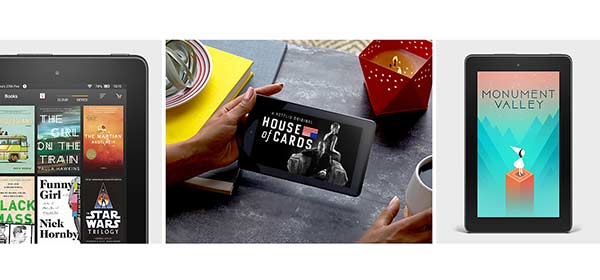
Read
Choose from millions of e-book and magazine titles. Connect with the largest online community of book lovers on Goodreads. Discover over a million titles with a Kindle Unlimited subscription. Also, listen to your favorite books with Audible.
Watch
Enjoy all your favorite movies and TV shows on Amazon Video, Netflix, HBO NOW, and more. Discover thousands of TV episodes and movies and fling it all to the big screen.
Play
Over 300,000 apps including favorites like Facebook, Twitter, and Spotify. Plus Amazon Underground, a one-of-a-kind app store experience where over $10,000 in apps, games, and even in-app items are 100% free. Play great titles like Frozen Free Fall, Angry Birds Slingshot Stella, and Sonic Dash from developers like Disney, Gameloft, Rovio Entertainment, and more.
Introducing Fire OS 5 “Bellini”
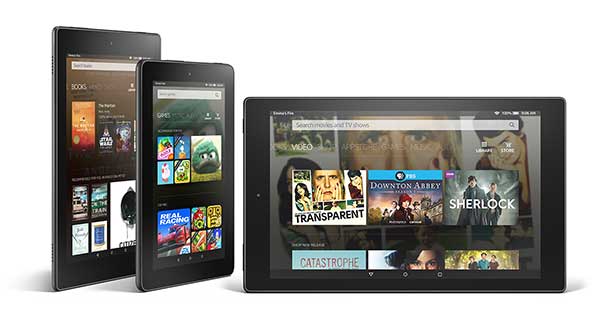
Updated user interface — Find the things you love easier
Fire OS 5 is the best entertainment experience on a tablet with quick access to the things you do most. The new home screen includes dedicated content pages for books, games and apps, video, music, audiobooks, and Newsstand, making it quick to pick up right where you left off.
All-New — Apps that are actually free with Amazon Underground
Fire tablet owners have access to a one-of-a-kind app store experience where over $10,000 in apps, games and even in-app items are actually free. Experience titles from top developers including Disney, Rovio Entertainment, Gameloft, Zeptolab and Sega of America without ever having to pay for the app or in-app purchases.
All-New — Read faster with Word Runner
Word Runner is a fun new way to read faster. It keeps your eyes focused on the center of the page and brings each word right to where your eyes already are. With Dynamic Pacing, Word Runner automatically slows down for difficult words, punctuation, and paragraph breaks. And when you first start reading, it gradually builds up to the speed you choose. If you miss something, just tap and hold the screen to activate the Brake.
Share content with Family Library
Family Library links your Amazon account to that of your spouse or partner so you can easily share apps, games, audiobooks, and books, and it now allows Prime members to share their Prime Instant Video. Access your family’s content across devices, including iOS and Android.
No more waiting
With ASAP (Advanced Streaming and Prediction) Amazon movies and TV shows are ready for you to watch instantly. ASAP dynamically adapts to your viewing habits.
Integrated on-device tech support
Mayday Screen Sharing brings Mayday-powered customer service to Fire tablets. Amazon experts can now connect to any Fire tablet to co-pilot through features by drawing on your screen, walking you through how to do something yourself, or doing it for you — whatever works best.
Product Features
- Beautiful 7″ IPS display (171 ppi / 1024 x 600) and fast 1.3 GHz quad-core processor. Rear and front-facing cameras.
- All-new Amazon Underground, a one-of-a-kind app store experience where over $10,000 in apps, games and even in-app items are actually free – including extra lives, unlocked levels, unlimited add-on packs and more
- Enjoy more than 38 million movies, TV shows, songs, books, apps and games
- 8 GB of internal storage. Free unlimited cloud storage for all Amazon content and photos taken with Fire devices. Add a microSD card for up to 128 GB of additional storage.
- Updated user interface – Fire OS 5 designed for quick access to your apps and content plus personalized recommendations that make it easy to discover new favorites
- Up to 7 hours of reading, surfing the web, watching videos, and listening to music
- Stay connected with fast web browsing, email, and calendar support
This is a steal for $50 as long as you aren;t expecting a “Premium” experience. 0
UPDATED: Incredible Value for Under $50! UPDATED – After spending quite a bit more time with the device, I would give it a 4.5 due to a few specific gaps that are a bit annoying. However, you are still getting an amazing 7” tablet, with front and rear facing cameras, a gorgeous interface, fairly snappy performance and durability, all for under 50 bucks! I can’t imagine not buying these for myself and my whole family, but not a primary tablet for a techie adult by any means. For background, I have every Kindle, a couple Fires, and multiple tablets from Apple, Microsoft and Samsung. Note that my review with 5 stars considers the value equation, not just performance and how that may or may not compare to other tablets – if you are expecting this to compare to a tablet costing several times more, don’t bother. But if you are looking for a great entry level tablet that does most of the things people want, this little tablet definitely delivers the value!PRICING/CONFIG: I prefer this tablet with ads and no accessories to keep the costs down. You have the option to spend more money, but I recommend against it. You can easily see the specs online, so I won’t do you the discourtesy of simply cutting and pasting those here. Here is the price breakdown:• 49.99 base price – what an incredible price point! Or buy 5 and get a sixth one free! This puts it into reach of schools and non-profits.• No sponsored screensaver ($15) – big deal that each time you turn it on it shows you something interesting you might want.• MicroSD card ($19.99 for 32GB) – you probably already have one laying around somewhere. Beyond that, there is memory in the device, and you are using the cloud for storage mostly anyway. If you end up needing this, just buy one off Amazon, it certainly won’t be more expensive. Also, the SD is likely less useful than you might think, since it is currently a bit limited in what can be stored on it.• Amazon Fire Case (24.99) – it is supposed to be 2x the durability of an iPad. No case needed.• Accident Protection (9.99) – who wants to spend 9.99 to insure a $49 device? During your install, they will give you another chance, and you can get the two year for 15.99 if you like. But to me, insurance is for catastrophic things, not a <$50 tablet. UPDATE – after looking into the accident protection, if I were giving it to kids, I might get the insurance. You can get a 1 year pretty cheap as long as you are in the US, and it covers everything from dropping it off a building, running it over with the car, or accidentally hitting it with a baseball bat. As long as you have the pieces, you are good, and there are no back and forth shipping charges to pay.• That is a total of $119.97, or almost triple the price. If you’re buying this device, you’re probably a bit price sensitive – if you aren’t, you’re buying a different device and this review is somewhat irrelevant.GETTING STARTED: Here is some timing for me to get started with this device:• 1 minute – open box and read instructions• 18 minutes – download and update to latest Fire software. If you are giving it as a gift, it is simply good form to turn it on first to get the updates done, even if you are not setting it up under your own name.• Battery started at 65%, so I had plenty of time to connect, download, and play around with the device.• I ordered it without my account being integrated, just as if I were buying it as a gift, unregistered. However, it came pre-configured with all of my information. If you are giving them away, I would double check this.• Tutorials are super simple and quick, and well worth doing if you are unfamiliar with the Fire interface. It is really nice that they integrate your own data into the tutorials.• HINT: While setting up, go to settings, select security, and take care of adding a passcode to your device. If you ever lose it, someone can cause some havoc if you don’t.APPSTORE: Appstore Underground is fantastic. Simple to use, lots of great apps. Nice to know I won’t get gouged here for other fees since everything is included. I have not yet explored the quality of apps available here, so more on that in a later update. Had all my critical apps – LinkedIn, Pinterest, Twitter, Skype, etc. However, as noted, you cant use apps from the Android store, so you have to wait for them via Amazon. Not too big of a deal for me, but others might find it a problem.EMAIL: Email setup was a breeze. In less than 3 minutes, I had my Office 365 account, yahoo account and gmail all set up and flowing perfectly. The interface for switching accounts is one of the easiest I have ever used.CAMERA: The…