

Kindle is our most affordable e-reader—now with a touchscreen display, exclusive Kindle features, twice the storage, and more.
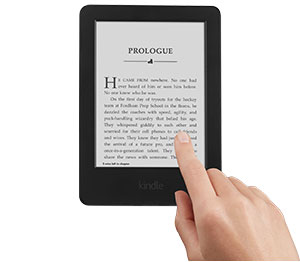
Designed for readers
Kindle is purpose-built for reading. Indulge your love of reading without interruptions like email alerts and push notifications. The weeks-long battery life allows you to read for weeks on a single charge. Kindle uses actual ink particles and proprietary, hand-built fonts to create crisp text similar to what you see in a physical book. Kindle is lighter than most paperback books, making it easy and comfortable to hold in one hand for extended periods of time.
Easy on the eyes
Every time your eyes switch from a bright screen to a dimmer, ambient room, your eyes have to adjust, which may result in fatigue. With Kindle, the page is the same brightness as everything else in the room, so there’s no adjustment needed. Choose from eight text sizes to prevent tired eyes and keep you reading longer.
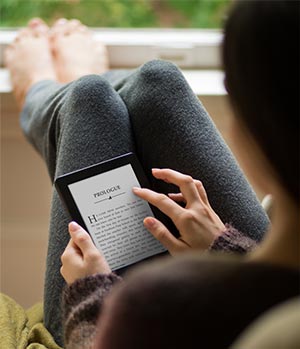
Flip through without losing your place
With Page Flip, you can skim page-by-page, scan by chapter, or skip to the end for a sneak peek without losing your place.
Take and share notes
Add margin notes that you can edit, delete, or even export from your device to your computer. Share highlighted sections and meaningful quotes on Facebook, Twitter, and Goodreads, and see passages frequently highlighted by other Kindle readers.
Go beyond a book with the following features (coming soon)
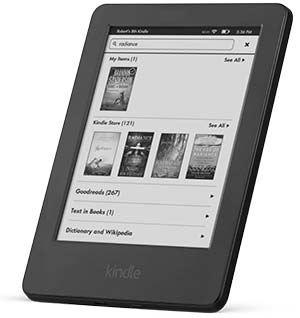
Enhanced search
It’s even easier to find what you are looking for by combining and previewing results from your Library, Goodreads, and the Kindle Store on the same page.
Family Library
Family Library links your Amazon account to that of your spouse or partner. For the first time, you and your family can access and easily share not only your own Kindle books, but also books from the Amazon account of a spouse or partner.
Word Wise
Word Wise, available on many popular English language titles, makes it easier to enjoy and quickly understand more challenging books. Short and simple definitions automatically appear above difficult words, so you can keep reading with fewer interruptions. Tap on a word to bring up a simple card with definitions, synonyms, and more. You can adjust the number of hints you see with a simple slider.
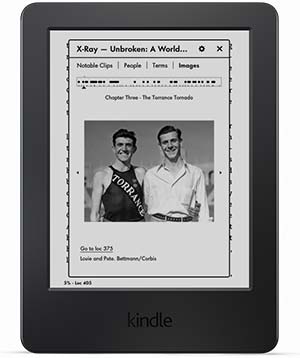
Expanded X-Ray
X-Ray’s new timeline view lets you easily flip through notable passages to remind yourself of what’s happened in the book, or navigate easily through images. X-Ray lets you explore the “Bones of the Book.” See all the passages across a book that mention relevant ideas, fictional characters, historical figures, places, or topics of interest.
About the Book
With About the Book, see information about the book as you start to read, including its place in a series and author information, plus mark it as “Currently Reading” on Goodreads.
Never be without a book
Shop Amazon’s expansive selection, choose a title, and begin reading in seconds. Download books in under 60 seconds—no computer required. Connect easily to your home Wi-Fi network or Wi-Fi hotspots on the road. Enjoy free Wi-Fi access at AT&T hotspots across the U.S. With our fast, free wireless delivery, borrow Kindle books from your public library and start reading on your Kindle.
Compare Kindle E-readers
| Kindle | Kindle Paperwhite | Kindle Voyage | |
| Price | From $79 | From $119 | From $199 |
| Resolution | 167 ppi | 300 ppi | 300 ppi |
| Built-In Light | No | Yes | Yes + Adaptive light sensor |
| Page Turns | Touchscreen | Touchscreen | Touchscreen + PagePress |
| Connectivity | Wi-Fi | Wi-Fi or Wi-Fi + free 3G | Wi-Fi or Wi-Fi + free 3G |
| Screen Size | 6″ | ||
| Glare-Free Screen | Yes | ||
| Battery Life | Weeks on a single charge | ||
| Storage | Holds thousands of books | ||
| Weight | 6.7 oz | Wi-Fi: 7.2 oz Wi-Fi + 3G: 7.6 oz |
Wi-Fi: 6.3 oz Wi-Fi + 3G: 6.6 oz |
| Dimensions | 6.7″ x 4.7″ x 0.40″ | 6.7″ x 4.6″ x 0.36″ | 6.4″ x 4.5″ x 0.30″ |
Product Features
- Touchscreen display that reads like real paper-no screen glare, even in bright sunlight
- Holds thousands of books and lighter than a paperback
- Battery lasts weeks, not hours
- Download books in less than 60 seconds with built-in Wi-Fi
- Encourage kids to read even more with Kindle FreeTime, Vocabulary Builder, Word Wise, and more
- Massive book selection, lowest prices – over a million titles less than $2.99
- Try Kindle Unlimited free for 30 days – choose from over 800,000 titles
Detailed Review of the Kindle As has been the case for years, Amazon sloooowwwwly adds new changes and features to the Kindle. This one is no exception. If you’ve used a Kindle in the past, you’re not going to notice much of a change with this one, but since there are some minor upgrades and so forth, I’ll briefly go over them:*** SCREEN ***The new Kindle is touchscreen and has the typical matte finish with the slightly gray/off-white paper looking background. It’s certainly not bright white, but it’s also not LCD looking (dark gray.) It does NOT have buttons for page-turning as the older generations do. If you simply must have the page-turning buttons, please search for the older Kindles that offer that. One last thing regarding the screen: this is not a Kindle PaperWhite or Voyage where you have a back-lit screen… this has an unlit, off-white Kindle screen. I will say, the text is noticeably crisper and bolder than I’ve seen with previous generation Kindles and I believe that’s because Amazon is using E-Ink’s new “Carta” displays instead of the previously used “Pearl” displays. I love that and have been waiting for years for E-Ink, the Taiwan based company that makes the Kindle screens for Amazon, to improve them. It looks like they’re finally getting it!The new Kindle’s screen resolution is 167 ppi which is slightly lower than the Kindle PaperWhite which is 212 ppi, and substantially lower than the Kindle Voyage which boasts an impressive 300 ppi (individual pixels at this density can not be distinguished by the naked eye.) Price-wise though, the base model PaperWhite runs $99 at the time of this review, and the Voyage base model runs $199 so you can see, the more you pay, the better the resolution and features. 167 ppi is fine though… in fact, most webpages are 72 dpi to give you a comparison.*** SPECIAL OFFERS OR NOT ***Like other Kindles, you have the choice of purchasing one with “special offers” which is simply a marketing tactic Amazon uses, which, although some people may find annoying, I actually like as it recommends books that I’m actually interested in versus random crap I’d never buy.*** ON-BOARD STORAGE AND PROCESSOR SPEED ***One upgrade the new Kindle has is the amount of on-board storage which now allows you to hold thousands of books and of course, it also comes with a slightly faster processor which Amazon claims is 20% faster although honestly, I don’t notice the increase in speed. Pages turn quickly and that’s all that really matters to me speed-wide. The on-board storage is 4GB, although you also have unlimited access to the Amazon Cloud so there really shouldn’t be any worries about storage.*** BATTERY LIFE ***Even going back a few years, the Kindle Paper White bragged about a battery that lasted a week versus a day. For very casual reading, that was true with the Paper White although with regular daily use, it was more like 4 days or so, not a week. The new Kindle has a similar claim in that the battery lasts weeks, not days; that appears to be true. You can easily go two weeks with casual reading and most of that is attributed to the fact that there is no on-board light draining the battery.*** WI-FI CAPABILITY (NOT 3G!)Books are downloaded quickly through WiFi, usually in less than 30 seconds, and definitely under a minute, unless you have really crappy internet service. THIS IS NOT 3G so you CANNOT download books unless you have access to WiFi. I have never found this a problem as I download my books at home in advance of leaving for a trip or something. Besides, nearly every McDonalds, Starbucks, and hundreds of other retailers and restaurants now offer free WiFi so if you simply must download that book while travelling, go park in a McDonalds parking lot and download the book. It’s not worth paying the extra money for the 3G access, especially when it oftentimes raises the product price by $50 or more.*** DICTIONARY AND HIGHLIGHTING FEATURES ***Like all new Kindles, the touchscreen has some major advantages, one being that you can click on a word you don’t know and pull up the dictionary to learn what it means. Also, you have the option of turning on the “highlight” feature where you can highlight important text AND see what areas of text others have highlighted the most. For someone reading a book for research purposes (writing a paper, review, etc.), this is a nice feature as the parts of the book people find most helpful are usually highlighted, alerting you to its importance.*** AMAZON PRIME BENEFITS ***As is the case with all Kindles, subscribing to the Amazon Prime service is going to give you a lot of bang for your buck as you can “borrow” thousands of books for free, and also get special pricing on some items.*** ACCESS TO YOUR BOOKS ***Books are stored in the cloud and are accessible by any…
Know what you are buying!!!! 0